Start with a well-fitting ring
Both stores list Uniqo Lab. as the developer. The ring-screen method is useful when you already have a ring that fits the intended finger.
- Choose a relatively flat ring that fits the intended finger. Place it flat on the phone when the app’s ring guide is open.
- Adjust the on-screen guide to the inner edge. Leave the metal of the band outside the circle.
- Read the unit and sizing system shown on your device. If the estimate is surprising, take a separate ruler measurement before using the result.
Sources Aeterna Jewelry · Sizing an existing ring · US App Store · Ring Sizer by Jason Withers
What the stores show on each platform
| Feature | iPhone / iPad | Android |
|---|---|---|
| Units and measurements | Metric or imperial. Diameter or circumference. | Metric or imperial. Diameter or circumference. |
| Size systems named | US, Australia, UK, Europe, Japan and China. | US, Australia, UK, Europe, Japan and China. |
| Access details | The US listing shows in-app purchases and describes Premium ad-free access. | Google Play marks the app as containing ads. |
| Existing-ring guide | The iPhone gallery shows a circle, slider and button to view the size. The developer specifies the inner edge. | The Google Play gallery shows a circle and slider above a table of size systems. |
| Without an existing ring | The iPhone screenshots include By finger and Offline tabs alongside diameter and circumference views; follow the prompts in your installed iPhone version or measure with string. | Follow your installed Android screen prompts, or measure your finger with a paper strip and enter millimeters into our circumference chart. |
Sources US App Store · Ring Sizer by Jason Withers · Google Play · Ring Sizer by Jason Withers
Can I use the app without a ring?
Yes, you have two straightforward paths. On iPhone, the store preview shows By finger and Offline tabs alongside diameter and circumference views; follow the prompts inside your installed version for entering a finger reading.
If you prefer to measure directly with a strip of paper or flexible tape, measure the millimeter distance around your finger base and enter it into the circumference field in our chart.
Sources US App Store · Ring Sizer by Jason Withers · Google Play · Ring Sizer by Jason Withers · Jewelers Mutual · Measuring a ring at home
Getting the cleanest phone reading
Follow any calibration or display setup instructions inside the app before aligning a ring, keep the camera view perpendicular to the screen, and disable temporary Display Zoom scaling if an earlier reading shifts.
When a measurement sits right between neighboring half sizes (such as US 7 at 17.3 mm vs US 7½ at 17.7 mm), confirm with a millimeter ruler or compare both neighboring sample rings.
Sources US App Store · Ring Sizer by Jason Withers · Google Play · Ring Sizer by Jason Withers · e14k · US size and millimeter chart
See the app on your platform
These ring measurement screenshots come from Uniqo Lab.’s US store listings. The guides explain what the galleries demonstrate and how to check the result when your screen or access differs.
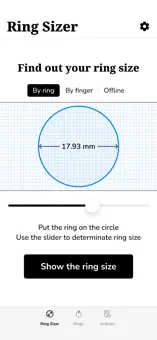

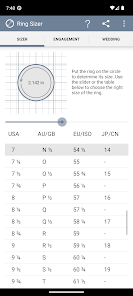
- Follow the iPhone steps
- Follow the Android steps
- Check an app estimate with a ruler
- Check what the store listings confirm
Sources US App Store · Ring Sizer by Jason Withers · Google Play · Ring Sizer by Jason Withers · Uniqo Lab. · App Store ring measurement screenshot · Uniqo Lab. · Google Play ring measurement screenshot
Key facts & when to use Ring Sizer by Jason Withers
Published by Uniqo Lab. on iOS (App Store) and Android (Google Play), Ring Sizer by Jason Withers focuses on fast ring-on-screen circle matching paired with built-in size tables for the US, Australia, UK, Europe, Japan, and China.
Choose the mobile app when you have an existing ring on hand away from a desk or want quick conversions across 6 international systems without manual formulas. Keep a rigid millimeter ruler handy as a cross-check when ordering high-value or non-resizable jewelry.
| Attribute | Confirmed in US store listings |
|---|---|
| App name & developer | Ring Sizer by Jason Withers · Uniqo Lab. |
| Platforms | iPhone & iPad (iOS 15+ / iPadOS 15+) and Android devices |
| Measurement focus | On-screen ring diameter circle + slider; mm and inch units |
| Size tables included | US, Australia, UK, Europe, Japan, China |
| Pricing & access | Free download on both stores; iOS lists Premium ad-free in-app purchases, Google Play notes ads |
- Back to Ring Sizer Guide home
- About publisher Uniqo Lab FZC
- Contact support (hello@99apps.me)
- Review international brand size charts
- Read Privacy Policy
- Read Terms of Use
- How app screenshots and charts are verified
Sources US App Store · Ring Sizer by Jason Withers · Google Play · Ring Sizer by Jason Withers
Ring Sizer app questions
Who publishes Ring Sizer by Jason Withers?
Both the US Apple App Store and Google Play listings publish the app under developer Uniqo Lab.
Which country size systems are shown in the app?
Both US store listings list sizes across six markets: United States, Australia, United Kingdom, Europe, Japan, and China, with metric (millimeter) and imperial (inch) measurements.
Should you align the circle with the inside or outside edge of a ring?
Always align the on-screen circle with the ring's inner edge, leaving the metal wall of the band outside the circle so thickness is not counted.
Is Ring Sizer by Jason Withers free?
Both App Store and Google Play listings offer a free download; iOS includes optional in-app purchases for ad-free Premium access, and Google Play notes that the app contains ads.
Latest source check: .