Match your ring to the circle
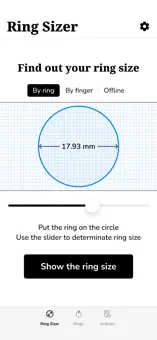
- Set your iPhone on a flat surface. Open the ring measurement screen. The App Store gallery calls this tab By ring.
- Use a round ring that sits flat and fits the intended finger. Center its opening over the on-screen circle and look straight down.
- Move the slider until the line meets the inside edge all the way around. Recenter the ring if one side lines up before the other.
- Use Show the ring size if your version has the button pictured below. For a US order, keep the US size and any millimeter reading for comparison with the seller’s chart.
Sources US App Store · Ring Sizer by Jason Withers · Aeterna Jewelry · Sizing an existing ring · Uniqo Lab. · App Store ring measurement screenshot

Measure your finger with string
The App Store preview shows dedicated By finger and Offline tabs alongside the main ring circle. Check the prompts in your installed iPhone version, or wrap non-stretchy string or paper around your finger and enter millimeters into our circumference chart.
- Wrap a piece of string around the base of the intended finger and mark where it meets the starting end. Keep the loop snug without tightening it into the skin.
- Lay the string flat next to a ruler. Measure the length from the starting end to the mark without stretching the string. That length is the circumference.
- If your version shows a circumference field, use the units named beside it. If the option is missing, enter the length in the millimeter circumference lookup on this site.
Sources Uniqo Lab. · App Store ring measurement screenshot · Jewelers Mutual · Measuring a ring at home · e14k · US size and millimeter chart
Ring guide and measurements table on iPhone
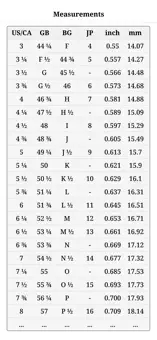
These publisher images show the ring guide and an example measurements table. The layout and conversion values on your installed version may differ.

iOS requirements and Premium access
The US listing requires iOS 15 or later on iPhone and iPadOS 15 or later on iPad. It lists a free download with in-app purchases and describes an ad-free Premium subscription. The instructions above describe the iPhone gallery.
The listing gives no clear rule for which result screens are available before purchase. If an offer appears, read the price, billing period and trial terms in Apple’s purchase prompt. To review an Apple-billed subscription you already started, open Settings, tap your name and choose Subscriptions.
Sources US App Store · Ring Sizer by Jason Withers · Apple Support · Manage an App Store subscription
If the circle or result looks wrong
First measure the same ring with a ruler. If you recently changed Display Zoom, find that setting on your iPhone and compare the same ring using your previous setting if it is comfortable for you. A change in the reading is a reason to use the physical measurement. If the ring tilts or the circle cannot meet both sides, take the ring to a jeweler for a fit check.
Sources Apple iPhone User Guide · Display Zoom · Aeterna Jewelry · Sizing an existing ring · Jewelers Mutual · Measuring a ring at home
Compare app options and international charts
Return to the full Ring Sizer app comparison or check international brand equivalents before placing an order.
Latest source check: .