Match the ring and read the size
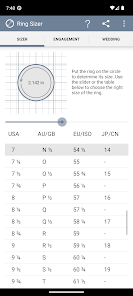
- Open the ring guide. Google Play’s screenshot shows a Size tab with a circle and slider above a table of sizing systems.
- Place a flat, round ring on the screen. Adjust the slider until the circle meets the inside of the band. Lift and recenter the ring if the line only matches on one side.
- Look for the size in the system you need. In the pictured layout the table appears below the slider. If your version shows a result separately, keep its system and any measurement unit when you record it.
Sources Google Play · Ring Sizer by Jason Withers · Uniqo Lab. · Google Play ring measurement screenshot · Aeterna Jewelry · Sizing an existing ring
Installation, ads and access to the result
Open the Google Play listing on the phone you plan to use. If Install is unavailable or your phone is grayed out on the web, check compatibility. Google Play says availability can depend on the device, Android version and country.
Google Play labels the app Contains ads. The listing gives no details on when ads appear, whether the result can always be viewed for free or whether on-device offers are available. If you cannot reach the result, you can get a size estimate from the ring opening with a ruler and chart.
Sources Google Play · Ring Sizer by Jason Withers · Google Play Help · Check app compatibility
Ring guide and catalog screens on Android
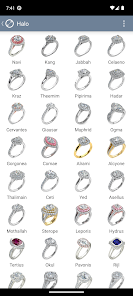
The Google Play screenshots show a ring guide with a size table and a separate catalog screen. Your installed version may use a different layout.
Get a finger measurement without a ring
If your version offers a finger measurement, check what quantity and units it asks for. The Android screenshots here document the ring guide and catalog. To get a circumference with a ruler, use a paper strip.
- Wrap a narrow paper strip around the base of the intended finger and mark the point where it overlaps.
- Measure from the starting edge to the mark in millimeters, then use the circumference field in the size chart. Repeat the measurement if the strip shifted or felt tight.
Sources Google Play · Ring Sizer by Jason Withers · Jewelers Mutual · Measuring a ring at home · e14k · US size and millimeter chart
If an Android reading changes
First check that both readings use the same unit and measurement. If you recently changed Display size, find that setting in Android Settings. If practical, reopen the app at the previous setting and repeat with the same ring. If the values differ, use a physical measurement for the order.
If you still can’t find your size in the app, use App support in the Play listing. Include your phone model, Android version and what appeared after you adjusted the guide.
Sources Android Accessibility Help · Display size settings · Google Play · Ring Sizer by Jason Withers
Compare app options and international charts
Return to the full Ring Sizer app comparison or cross-check millimeter readings across US, UK, EU, and Japanese size tables.
Latest source check: .